Print..Print
맨날 확인하려면 프린트해야해.
GUI로 멋지게 봐보자.
5 Steps of using TensorBoard
-
내가 Log화 하고 싶은 텐서들을 결정한다.
이것들은 함수로 구현할 수 있다.
w2_hist = tf.summary.histogram("weight2", W2) cost_sum = tf.summary.scalar("cost", cost) -
summary를 모두 병합한다.
summary = tf.summary.merge_all() -
파일쓰기를 위한 노드를 만든다. 그리고 그래프를 추가한다.
writer = tf.summary.FileWriter('./logs') writer.add_graph(sess.graph) -
summary 노드를 실행시키고 파일에 기록한다.
s, _ = sess.run([summary, optimizer], feed_dict - feed_dict) writer.add_summary(s, global_step=global_step) -
텐서보드를 실행시킨다.
$ tensorboard --logdir=./logs
Scalar tensors
cost와 같이 식이 한줄인, 즉 output이 스칼라값인 녀석들은 이 함수를 사용한다.
cost_summ = tf.summary.scalar("cost", cost)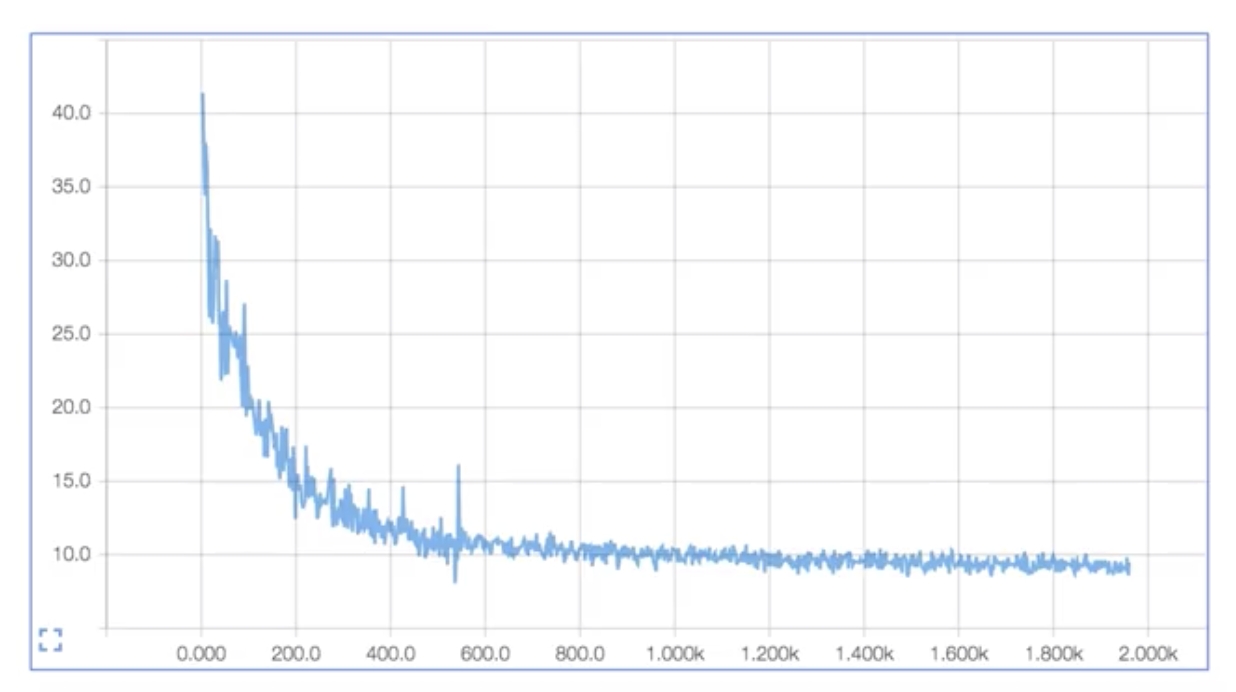
Histogram (multi-dimensional tensors)
W1 = tf.Variable(tf.random_normal([2, 2]), name="weight_1")
    b1 = tf.Variable(tf.random_normal([2]), name="bias_1")
    layer1 = tf.sigmoid(tf.matmul(X, W1) + b1)

    tf.summary.histogram("W1", W1)
    tf.summary.histogram("b1", b1)
    tf.summary.histogram("Layer1", layer1)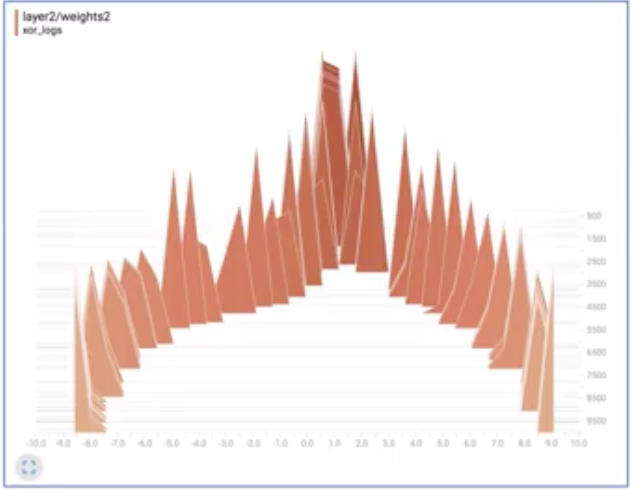
Scope (graph hierarchy)
with tf.name_scope("Layer1"):
W1 = tf.Variable(tf.random_normal([2, 2]), name="weight_1")
b1 = tf.Variable(tf.random_normal([2]), name="bias_1")
layer1 = tf.sigmoid(tf.matmul(X, W1) + b1)
tf.summary.histogram("W1", W1)
tf.summary.histogram("b1", b1)
tf.summary.histogram("Layer1", layer1)
with tf.name_scope("Layer2"):
W2 = tf.Variable(tf.random_normal([2, 1]), name="weight_2")
b2 = tf.Variable(tf.random_normal([1]), name="bias_2")
hypothesis = tf.sigmoid(tf.matmul(layer1, W2) + b2)
tf.summary.histogram("W2", W2)
tf.summary.histogram("b2", b2)
tf.summary.histogram("Hypothesis", hypothesis)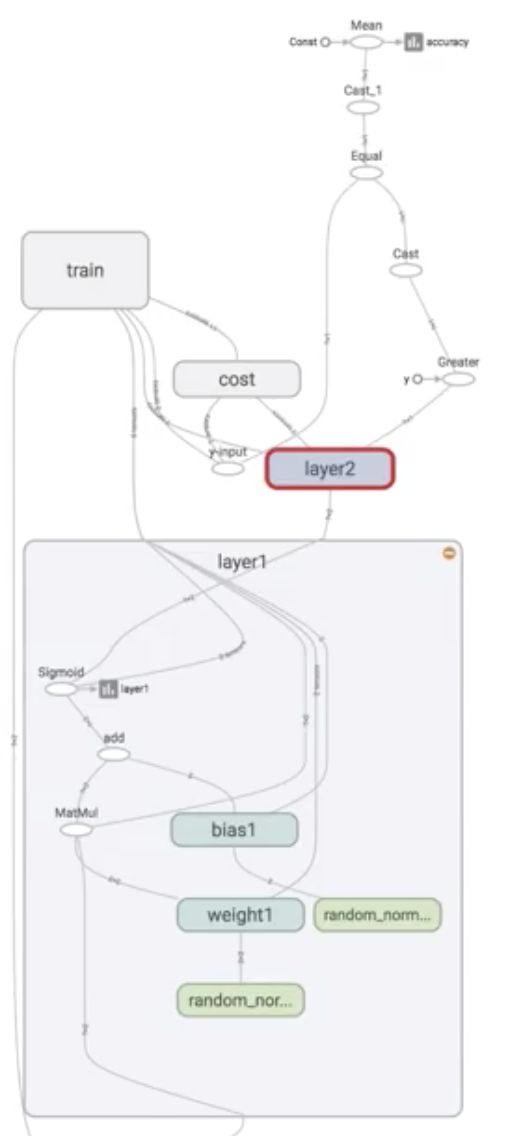 한번에 보기 힘드니 이렇게 계층 구조로 보여주는 방식이다.
해당 layer를 클릭할 경우 보다 상세한 그래프 구조를 볼 수 있다.
Merge summaries
merged_summary = tf.summary.merge_all()writer node 생성
writer = tf.summary.FileWriter("./logs/xor_logs_r0_01")
writer.add_graph(sess.graph)  # Show the graph
해당 경로에 로그파일을 쓰고,
이걸 sess.graph에 추가해줘!
Run merged summary and write
for step in range(10001):
        _, summary, cost_val = sess.run(
            [train, merged_summary, cost], feed_dict={X: x_data, Y: y_data}
        )
        writer.add_summary(summary, global_step=step)

        if step % 100 == 0:
step마다 그래프를 summary를 더해라.
Launch tensorboard(local)
파일을 쓴 경로를 설정하고
$ tensorboard --logdir=./logs/xor_logsLaunch tensorboard(remote server)
$ ssh -L local_port:127.0.0.1:remote_port username@server.com추가 공부가 필요함 추가로 다듬거나 공부해야 하는 것들
전체 코드
# Lab 9 XOR
import tensorflow as tf
import numpy as np

tf.set_random_seed(777)  # for reproducibility

x_data = np.array([[0, 0], [0, 1], [1, 0], [1, 1]], dtype=np.float32)
y_data = np.array([[0], [1], [1], [0]], dtype=np.float32)

X = tf.placeholder(tf.float32, [None, 2], name="x")
Y = tf.placeholder(tf.float32, [None, 1], name="y")

with tf.name_scope("Layer1"):
    W1 = tf.Variable(tf.random_normal([2, 2]), name="weight_1")
    b1 = tf.Variable(tf.random_normal([2]), name="bias_1")
    layer1 = tf.sigmoid(tf.matmul(X, W1) + b1)

    tf.summary.histogram("W1", W1)
    tf.summary.histogram("b1", b1)
    tf.summary.histogram("Layer1", layer1)

with tf.name_scope("Layer2"):
    W2 = tf.Variable(tf.random_normal([2, 1]), name="weight_2")
    b2 = tf.Variable(tf.random_normal([1]), name="bias_2")
    hypothesis = tf.sigmoid(tf.matmul(layer1, W2) + b2)

    tf.summary.histogram("W2", W2)
    tf.summary.histogram("b2", b2)
    tf.summary.histogram("Hypothesis", hypothesis)

# cost/loss function
with tf.name_scope("Cost"):
    cost = -tf.reduce_mean(Y * tf.log(hypothesis) + (1 - Y) * tf.log(1 - hypothesis))
    tf.summary.scalar("Cost", cost)

with tf.name_scope("Train"):
    train = tf.train.AdamOptimizer(learning_rate=0.01).minimize(cost)

# Accuracy computation
# True if hypothesis>0.5 else False
predicted = tf.cast(hypothesis > 0.5, dtype=tf.float32)
accuracy = tf.reduce_mean(tf.cast(tf.equal(predicted, Y), dtype=tf.float32))
tf.summary.scalar("accuracy", accuracy)

# Launch graph
with tf.Session() as sess:
    # tensorboard --logdir=./logs/xor_logs
    merged_summary = tf.summary.merge_all()
    writer = tf.summary.FileWriter("./logs/xor_logs_r0_01")
    writer.add_graph(sess.graph)  # Show the graph

    # Initialize TensorFlow variables
    sess.run(tf.global_variables_initializer())

    for step in range(10001):
        _, summary, cost_val = sess.run(
            [train, merged_summary, cost], feed_dict={X: x_data, Y: y_data}
        )
        writer.add_summary(summary, global_step=step)

        if step % 100 == 0:
            print(step, cost_val)

    # Accuracy report
    h, p, a = sess.run(
        [hypothesis, predicted, accuracy], feed_dict={X: x_data, Y: y_data}
    )

    print(f"\nHypothesis:\n{h} \nPredicted:\n{p} \nAccuracy:\n{a}")

"""
Hypothesis:
[[6.1310326e-05]
 [9.9993694e-01]
 [9.9995077e-01]
 [5.9751470e-05]]
Predicted:
[[0.]
 [1.]
 [1.]
 [0.]]
Accuracy:
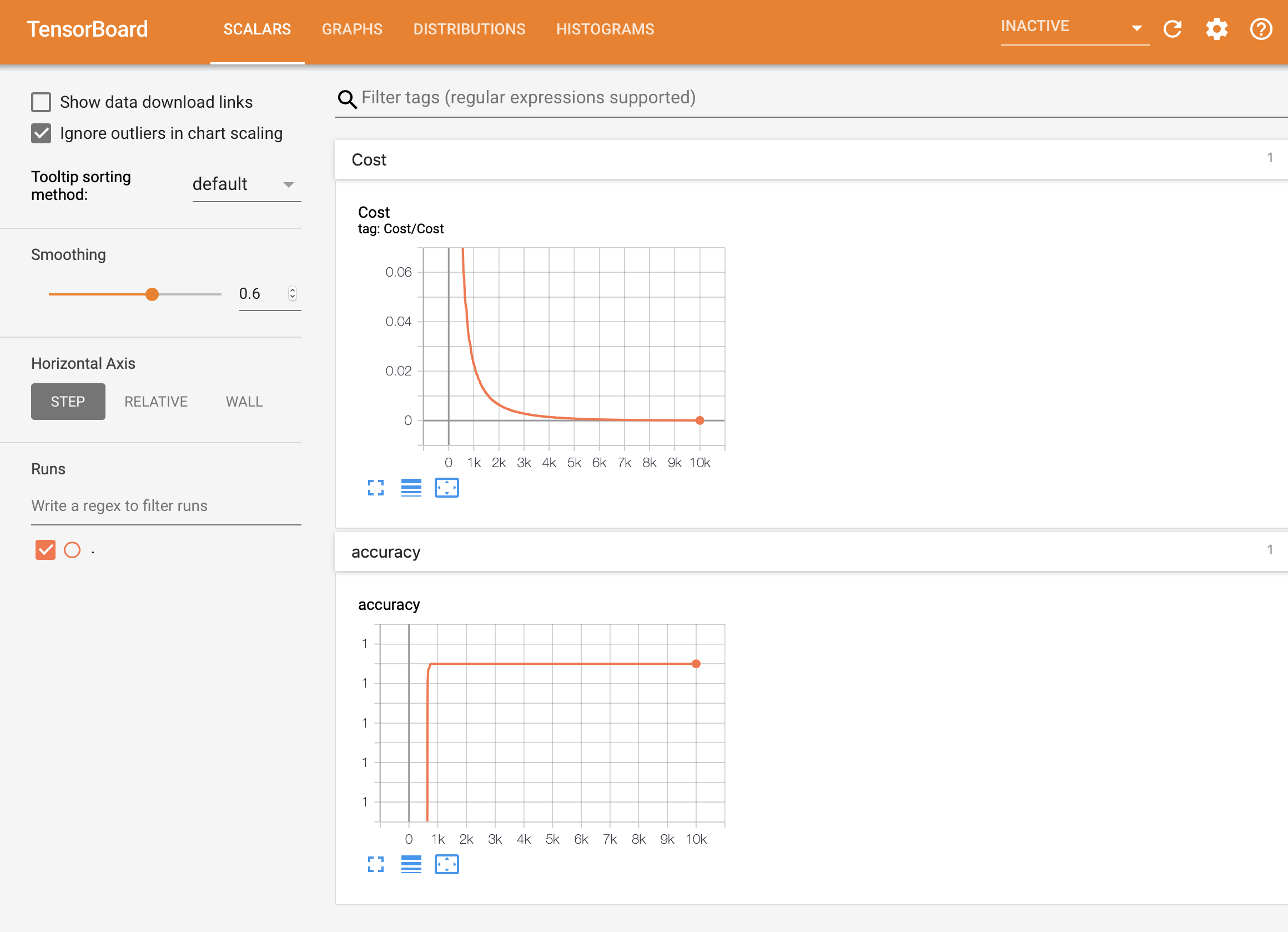
1.0
"""
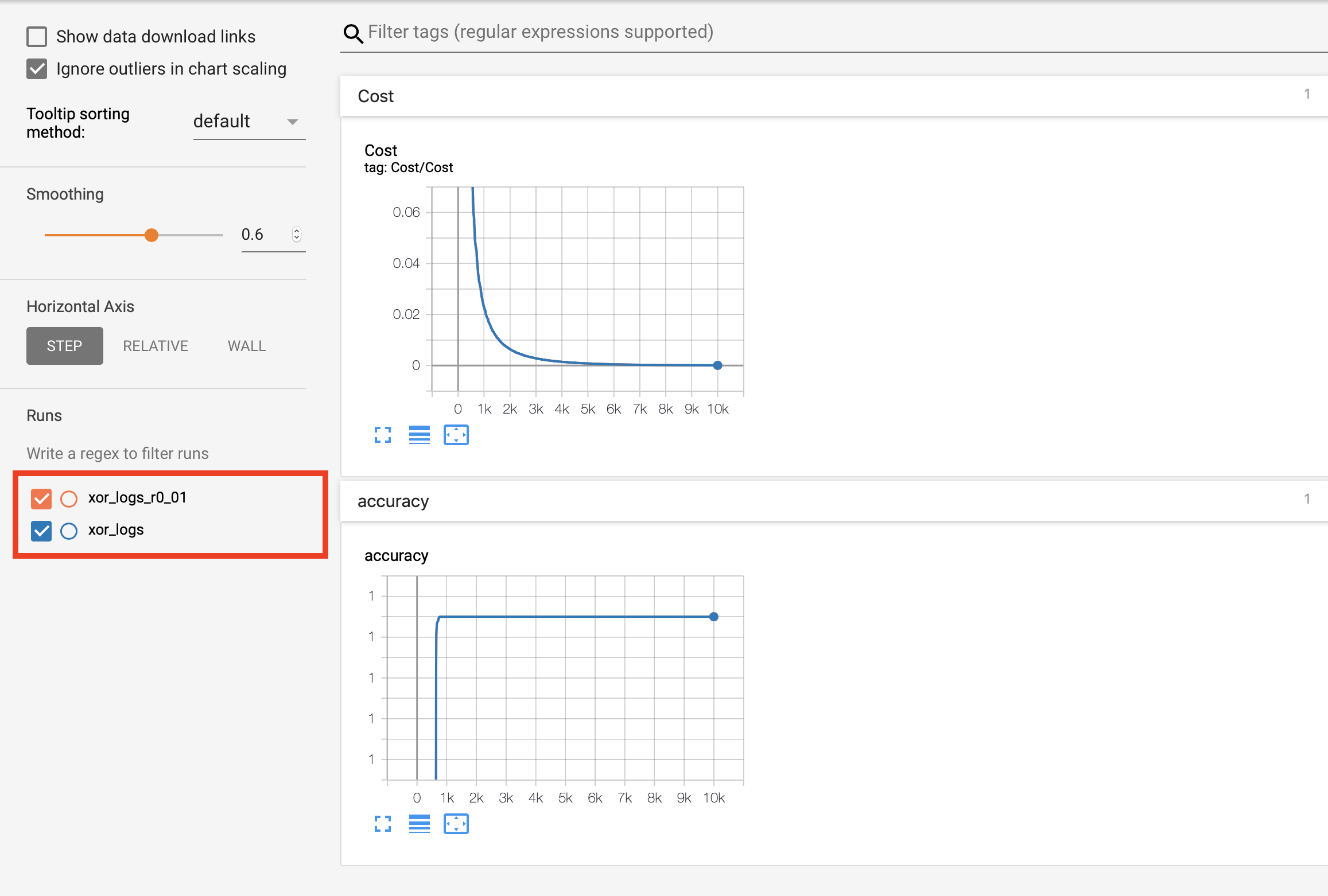
Multiple runs (파라미터를 바꿔서)
/logs 폴더안에 파라미터를 바꿔서 파일을 여러개 쓴다.
예를 들어 학습율을 다르게 쓴 녀석을 비교하고 싶다면,
with tf.name_scope("Train"):
    train = tf.train.AdamOptimizer(learning_rate=0.01).minimize(cost)
...
writer = tf.summary.FileWriter("./logs/xor_logs")
with tf.name_scope("Train"):
train = tf.train.AdamOptimizer(learning_rate=0.1).minimize(cost)
...
writer = tf.summary.FileWriter("./logs/xor_logs")이렇게 두개를 디렉토리를 다르게 해서 기록해 둔 뒤, terminal에서
$ tensorboard --logdir=./logs이렇게 상위 폴더를 실행시켜 버린다.
그러면 두 개의 그래프가 만들어지고, 비교할 수 있게 된다.
댓글